I’ve developed a few different apps with Razor Pages now. From my experiences, I’ve gravitated toward a specific monolithic architecture, set of dependencies, and continuous deployment approach that works for me as a solo developer working on hobby projects.
I start with dotnet new razor -o appname, remove the included frontend assets in wwwroot, add NPM, Bootstrap, Sass, a Sass site.scss, a package.json script to compile Bootstrap to wwwroot, ASP.NET Core Identity, Entity Framework Core (with SQLite),dotnet-ef to scaffold migrations, application classes derived from DbContext, IdentityUser, PageModel, Program.cs changes, a GitHub action to deploy the app to a VM, where it will run as a systemd service, served at a subdomain with Apache virtual hosts and secured with Let’s Encrypt.
This last weekend I started a new project, health, and deployed it with about one feature developed. This blog post describes the steps I followed to develop the minimal viable product and get it deployed. (While this initial work that I’ve done several times is fresh in my mind, I want to take some notes to document before I make this into an app template.)
New Razor Pages app with Sass-compiled Bootstrap
dotnet new razor -o health created the initial application, creating a new project called health in a folder health. Inside wwwroot, the lib folder which includes Bootstrap and jQuery was deleted.
To create package.json and add Sass and Bootstrap:
npm init -y

npm install bootstrap @popperjs/core
npm install --save-dev Sass
Popper is needed for some Bootstrap components like tooltips. To customize the Boostrap theme, I added a scss/site.scss file:
$primary: rgb(23, 209, 10);
$secondary: rgb(255, 8, 8);
$warning: #e2ff24;
$success: #b56aff;

@import "../node_modules/bootstrap/scss/bootstrap";

html {
  font-size: 14px;
}

@media (min-width: 768px) {
  html {
    font-size: 16px;
  }
}

.btn:focus, .btn:active:focus, .btn-link.nav-link:focus, .form-control:focus, .form-check-input:focus {
  box-shadow: 0 0 0 0.1rem white, 0 0 0 0.25rem #258cfb;
}

html {
  position: relative;
  min-height: 100%;
}

body {
  margin-bottom: 60px;
}
This is an example of the “option A” approach in Sass (Bootstrap docs):
// Custom.scss
// Option A: Include all of Bootstrap

// Include any default variable overrides here (though functions won’t be available)

@import "../node_modules/bootstrap/scss/bootstrap";

// Then add additional custom code here
The additional custom code here is from the original wwwroot/css/site.css that was deleted. After adding the script to build Bootstrap from node_modules using Sass to wwwroot, this is the package.json (also with scripts to copy the Bootstrap JavaScript assets-<script src="~/js/bootstrap.bundle.min.js"></script> is inside the layout </body>):
{
  "name": "health",
  "version": "1.0.0",
  "main": "index.js",
  "scripts": {
    "build:css": "sass scss/site.scss wwwroot/css/site.css",
    "build-bootstrap-js-win": "copy \"node_modules\\bootstrap\\dist\\js\\bootstrap.bundle.min.js\" \"wwwroot\\js\\bootstrap.bundle.min.js\"",
    "build-bootstrap-js-linux": "cp node_modules/bootstrap/dist/js/bootstrap.bundle.min.js wwwroot/js/bootstrap.bundle.min.js",
    "build-assets-linux": "npm run build:css && npm run build-bootstrap-js-linux"
  },
  "keywords": [],
  "author": "",
  "license": "ISC",
  "description": "",
  "devDependencies": {
    "sass": "^1.94.2"
  },
  "dependencies": {
    "@popperjs/core": "^2.11.8",
    "bootstrap": "^5.3.8"
  }
}
Having Sass compile the Bootstrap to the same path and file name as what dotnet new means the existing <link> will pull in the stylesheet.
Adding ASP.NET Core Identity and Entity Framework Core
Next, these packages were added:
dotnet add package Microsoft.EntityFrameworkCore --version 8
dotnet add package Microsoft.EntityFrameworkCore.Design --version 8
dotnet add package Microsoft.EntityFrameworkCore.Sqlite --version 8
dotnet add package Microsoft.AspNetCore.Identity.EntityFrameworkCore --version 8
To save time adding using statements later, I add a GlobalUsings.cs with these since the types will be used throughout virtually every C# file in the project:
global using Microsoft.AspNetCore.Mvc;
global using Microsoft.AspNetCore.Mvc.RazorPages;
global using Microsoft.AspNetCore.Identity;
global using Microsoft.AspNetCore.Identity.EntityFrameworkCore;
global using Microsoft.EntityFrameworkCore;
global using health.Data;
global using health.Models;
There needs to be a application class that derives from EF Core’s DbContext; but in this case to use EF Core with ASP.NET Core Identity, it derives from IdentityDbContext using a class User that derives from IdentityUser.
namespace health.Data;

public class Db(DbContextOptions<Db> options) : IdentityDbContext<Models.User>(options)
{
}
When the initial migration is scaffolded later with dotnet-ef, the target SQLite schema will include tables for ASP.NET Core Identity.
In appsettings.json, a default connection string is needed:
"ConnectionStrings": {
    "DefaultConnection": "Data Source=health.db"
  }
However, I only want that to be for development, so in Program.cs the connection string is taken from an environment variable if it’s the production environment:
string connectionString = null!;

if (builder.Environment.IsDevelopment())
{
    connectionString = builder.Configuration.GetConnectionString("DefaultConnection")
    ?? throw new InvalidOperationException(
        "Is SQLite connection string in appsettings.json missing?");
}
else if (builder.Environment.IsProduction())
{
    connectionString = builder.Configuration["health_DATABASE_PATH"]
        ?? throw new InvalidOperationException(
            "Is health_DATABASE_CONNECTION environment variable present?");
}
This is also needed to register Db and ASP.NET Core Identity services into the DI container:
builder.Services.AddDbContext<Db>(options =>
{
    options.UseSqlite(connectionString);
});

builder.Services.AddDefaultIdentity<User>(options =>
{
    options.SignIn.RequireConfirmedAccount = false;
})              .AddEntityFrameworkStores<Db>();
This command scaffolds the initial migration that will create the database:
dotnet ef migrations add Initialand in Program.cs, after the app is created, the migrations can be run like so inside a service scope:
var app = builder.Build();

using IServiceScope scope = app.Services.CreateScope();
Db db = scope.ServiceProvider.GetRequiredService<Db>();
db.Database.Migrate();
so starting the app will create health.db.
Finally, pages can be added for login, register, and logout, which are just custom Razor Pages endpoints that use ASP.NET Core Identity services UserManager and SignInManager (see this commit for the examples). Nav links for those pages were added to the layout as well with some conditional rendering logic (in the Bootstrap navbar):
<ul class="navbar-nav flex-grow-1">
    @if (User.Identity?.IsAuthenticated == true)
    {
        <li class="nav-item">
            <a class="nav-link" asp-area="" asp-page="/Index">Home</a>
        </li>
    }
    else
    {
        <li class="nav-item">
            <a class="nav-link" asp-page="/Identity/Register">Register</a>
        </li>
        <li class="nav-item">
            <a class="nav-link" asp-page="/Identity/Login">Login</a>
        </li>
    }

    @if (User.Identity?.IsAuthenticated == true)
    {
        <li class="nav-item d-flex align-items-center">
            <form method="post" asp-page="/Identity/Logout" class="d-inline">
                <button type="submit" class="nav-link btn btn-link p-0">
                    Log out
                </button>
            </form>
        </li>
    }
</ul>
With all that setup, the app has a database and ability to register, login, and logout users.
Initial work on the app
With this app, all the data will belong to a specific user. So all entities can derive from a class with a UserId foreign key property:
using System.ComponentModel.DataAnnotations.Schema;

namespace health.Models;

public abstract class Entity
{
    public string Id { get; set; } = Guid.NewGuid().ToString();

    [ForeignKey(nameof(User))]
    public string UserId { get; set; } = null!;

    public User User { get; set; } = null!;
}
and rather than decorate all the pages with [Authorize] individually, that can be applied to a parent class for page models where the user must be authenticated to access, with some methods to access the current user:
using System.Security.Claims;
using Microsoft.AspNetCore.Authorization;

namespace health.Pages;

[Authorize]
public abstract class AuthedPageModel(
    Db db,
    UserManager<User> userManager) : PageModel
{
    protected readonly Db Db = db;
    protected readonly UserManager<User> UserManager = userManager;

    private string? _currentUserId;

    protected string CurrentUserId =>
        _currentUserId ??=
            User.FindFirstValue(ClaimTypes.NameIdentifier)
            ?? throw new InvalidOperationException(
                "No name identifier claim to get current user ID."
            );


    private User? _currentUser;

    protected async Task<User> GetCurrentUserAsync()
    {
        if (_currentUser is not null)
            return _currentUser;

        _currentUser = await UserManager.FindByIdAsync(CurrentUserId)
            ?? throw new InvalidOperationException(
                $"User with id {CurrentUserId} not found."
            );

        return _currentUser;
    }
}
Since the user has to be authenticated for these page models, the ! “trust me this is not null” is OK as there should be a user. Private backing fields/memoization is also used here to avoid redundantly retrieving the current user.
The page model for the index page of the site was also updated to redirect to a different dashboard page for authenticated users:
namespace health.Pages;

public class IndexModel(ILogger<IndexModel> logger) : PageModel
{
    private readonly ILogger<IndexModel> _logger = logger;

    public IActionResult OnGet()
    {
        if (User.Identity?.IsAuthenticated == true)
        {
            return RedirectToPage("/Dashboard/Index");
        }

        return Page();
    }
}
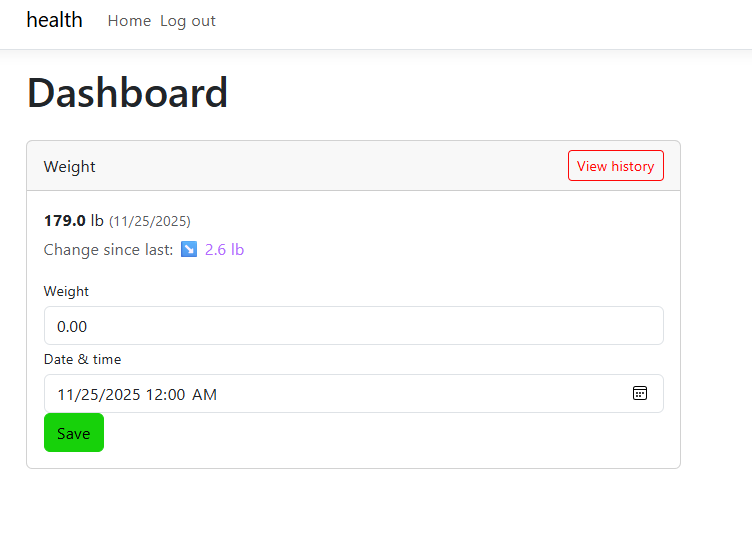
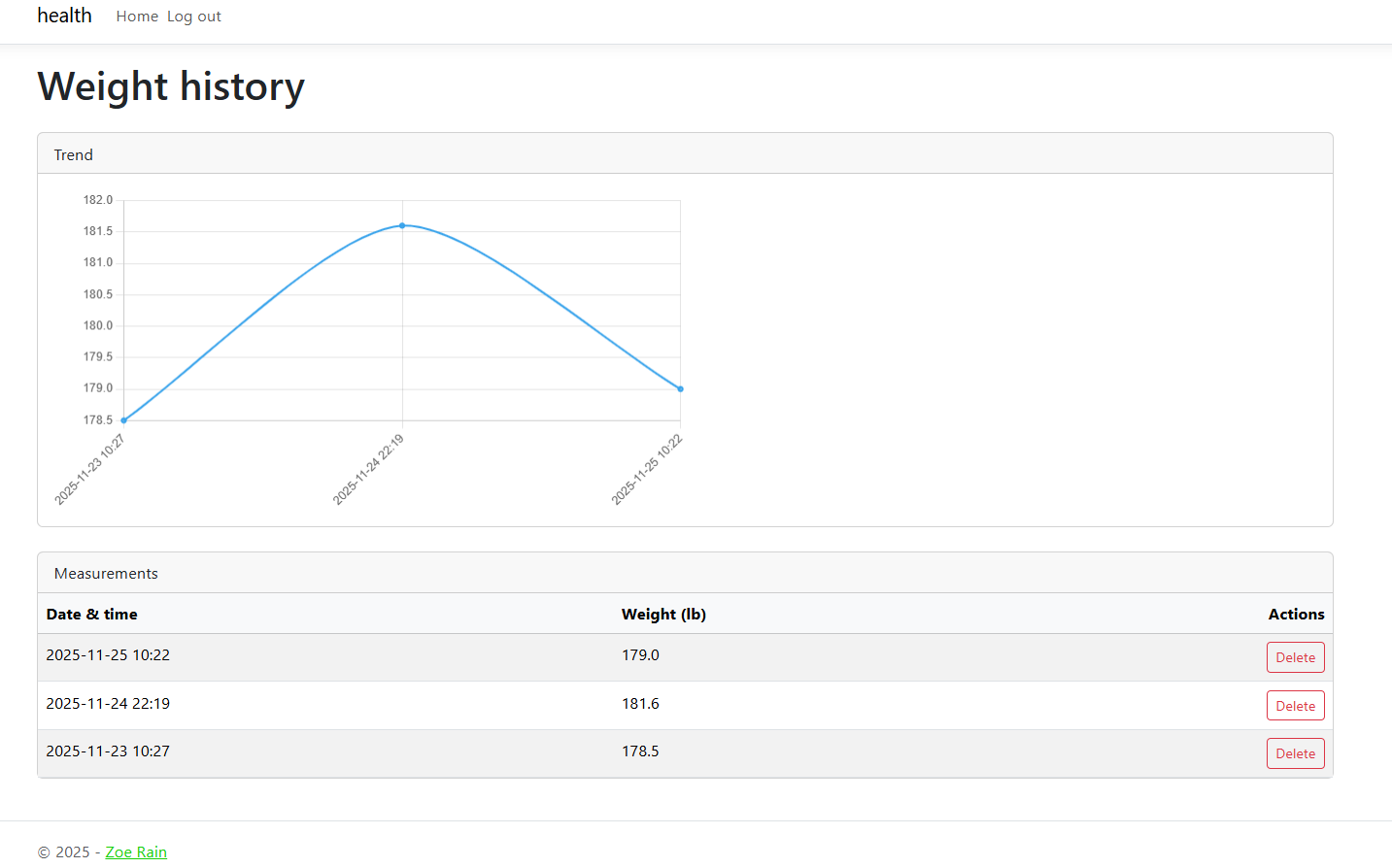
With this initial work, a single weight-tracking feature was developed: a card in the dashboard which allows entering weight measurements and a weight history page with a graph and a table of individual data points that can be deleted:
Deployment
Namecheap A record: Host is the subdomain string, Value is the VM’s IP address. After the app runs as a systemd service,
[Unit]
Description=appname

[Service]
Type=simple
WorkingDirectory=/home/.../bin/Release/net8.0/linux-arm64/publish
User=username
ExecStart=/home/.../bin/Release/net8.0/linux-arm64/publish/health
Environment=ASPNETCORE_URLS="http://0.0.0.0:5777"
Environment=health_DATABASE_PATH="Data Source=/.../health/health.db"

[Install]
WantedBy=multi-user.target
The folder may need to be set with the right permissions as the containing folder may belong to root.
Apache: reverse proxy to the app listening on the specified port by the environment variable in the service file. Once the site is served over HTTP, the command to get the Let’s Encrypt certificate is run, and the HTTP Apache .conf for the site is edited to redirect to HTTPS.